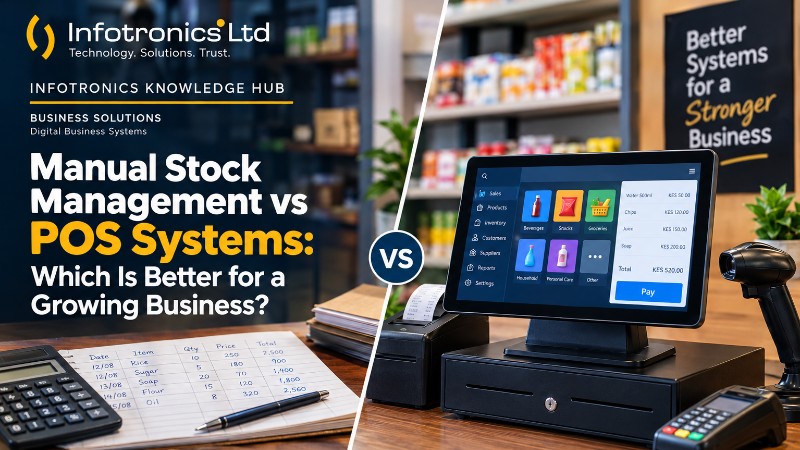
Manual Stock Management vs POS Systems: Which Is Better for a Growing Business?
Infotronics Knowledge Hub
Infotronics Business Solutions
Helping you make smarter technology decisions.
Manual Stock Management vs POS Systems: Which Is Better for a Growing Business?
Reading Time: 8–10 Minutes
Last Updated: September 2026
Quick Answer
Manual stock management can work well when a business is small, has a limited number of products, and handles relatively few transactions.
As the business grows, however, keeping track of purchases, sales, stock levels, returns and business performance manually can become increasingly difficult.
A POS system can bring many of these activities into one digital environment, making records easier to organize and review.
The better choice depends on the size of the business, the number of transactions, the complexity of its stock, and how much information management needs to track.
| If your business... | You may want to consider... |
|---|---|
| Has very few products and transactions | Manual records may still be practical |
| Is adding more products | Digital stock management |
| Is handling more daily sales | POS system |
| Is struggling to reconcile stock | POS system |
| Needs regular sales and stock reports | POS system |
| Has multiple branches | A system with branch management |
| Wants connected sales, stock and reporting | An integrated POS system |
The goal isn't to replace manual processes simply because technology exists.
The goal is to know when your business has grown beyond what those processes can comfortably handle.
Introduction
A business often starts simply.
A shop owner buys stock, records purchases in a notebook, writes down sales and counts the remaining products at the end of the day.
At the beginning, this may work perfectly well.
There may only be a few products, a small number of customers and one person handling most of the operations.
Then the business starts growing.
More products are added.
More customers walk through the door.
More sales happen every day.
New employees join the business.
Perhaps a second branch is opened.
Suddenly, the notebook that once seemed perfectly manageable is carrying much more information than before.
This is the point where many businesses begin asking an important question:
Should we continue managing stock manually, or should we move to a POS system?
There is no single answer for every business.
Manual records can still make sense in some situations. A POS system can become extremely useful in others.
What matters is understanding the difference and knowing what your business actually needs.
What Is Manual Stock Management?
Manual stock management means keeping track of inventory using methods that require people to record, calculate, update and review the information themselves.
This may include:
- Handwritten stock books
- Purchase records
- Sales notebooks
- Printed records
- Spreadsheets
- Manually calculated stock balances
For a small business, this can be an inexpensive and familiar way to start.
The owner may know most of the products personally, and the number of daily transactions may be small enough to manage without specialised software.
Why Manual Stock Management Can Work
It is important to be fair here.
Manual management isn't automatically wrong.
For a very small operation, it can offer some practical advantages:
- Low starting cost
- Simple setup
- No specialised software required
- Familiar processes
- Easy to begin with
If a business has only a small number of products and transactions, a manual system may be perfectly manageable.
The challenge usually appears when the volume and complexity of the business start increasing.
Where Manual Stock Management Starts Becoming Difficult
As a business grows, the amount of information that needs to be maintained grows with it.
Imagine a shop that has hundreds or thousands of different products.
Now imagine recording:
- Every purchase
- Every sale
- Every return
- Every stock adjustment
- Every change in price
- Every stock count
- Every supplier
- Every transaction
The more information there is, the more effort is required to keep everything accurate and up to date.
This can make it harder to answer simple questions such as:
Which products are selling fastest?
How much stock do we have?
What did we buy last month?
Which items are running low?
How much did we sell?
What did those sales cost us?
Which branch is performing better?
This is where digital systems can become valuable.
? Manual Management vs POS System
| Area | Manual Management | POS System |
|---|---|---|
| Sales records | Manually recorded | Digitally recorded |
| Stock updates | Manual | Can be connected to transactions |
| Product records | Notebook/spreadsheet | Centralised digital records |
| Reporting | Often prepared manually | Reports can be generated from recorded data |
| Stock alerts | Manual checking | Can identify items below set thresholds |
| Returns | Manual reconciliation | Can be recorded separately |
| Supplier records | Separate records | Can be maintained within the system |
| Multi-branch visibility | More difficult to coordinate | Branch information can be managed within the system |
| Searching records | Can take time | Searchable digital records |
| Data export | Depends on method used | Export options may be available |
The exact capabilities depend on the POS system being used.
The important difference is that an integrated POS can connect several business activities rather than keeping them as separate records.
What Changes When a Business Uses a POS System?
A POS system can bring together information that might otherwise be maintained in different notebooks, spreadsheets or registers.
Instead of having one place for products, another for suppliers, another for sales and another for stock counts, an integrated system can connect those records.
This is one of the main differences between simply recording transactions and having a digital business-management system.
For example, DukaPOS documentation describes a connected workflow linking suppliers, purchases, products, stock, sales, returns and reporting.
? A Simple Example
Imagine a shop receives ten cartons of a product from a supplier.
With a manual process, someone may record the purchase, calculate the quantity, update the stock book and later record each sale separately.
With an integrated POS system, the purchase can be recorded with the supplier, quantity and pricing information, while the resulting stock can become part of the inventory record. Sales can then contribute to the recorded stock movement and reporting. That connected flow is part of the documented DukaPOS workflow.
The difference isn't simply that the information is digital.
The bigger difference is that the information is connected.
? Infotronics Expert Tip
Don't wait until your records become impossible to manage before thinking about digital systems.
A better approach is to watch for the warning signs:
More products + more transactions + more employees + more locations = more information to manage.
When the information becomes difficult to track manually, it's worth evaluating a digital solution.
Stock Management Is More Than Counting Products
One common misunderstanding is that stock management simply means knowing how many items are on a shelf.
In reality, good stock management involves understanding the movement and value of inventory.
A business needs to know:
- What came into stock
- What was sold
- What was returned
- What remains
- What it cost
- What it can be sold for
- Which items are running low
This is where an integrated system can provide more useful information.
DukaPOS, for example, connects purchasing, product information, stock levels, sales, returns and stock alerts within its documented retail workflow.
What About Stock Alerts?
One of the challenges of manual stock control is knowing when a product is approaching a low level.
Someone has to check the records, identify the quantity remaining and decide whether replenishment is necessary.
DukaPOS includes a Stock Alert function that identifies items below a stated quantity threshold and displays information such as quantity, buying price, selling price, total cost and sale value.
For a busy retail operation, that kind of visibility can help management pay attention to products that may require replenishment.
What About Sales and Returns?
A business doesn't only need to know how much stock it has.
It also needs to understand how products are moving.
A sale changes inventory.
A return can reverse part of that movement.
Keeping those activities organised becomes increasingly important as transaction volume grows.
DukaPOS separates Make Sales, Sale Drafts and Sales Returns, while its sales reporting captures quantities, selling values, costs, VAT and profit.
This creates a more traceable flow from stock to sales and returns.
Reporting: From Records to Business Information
This is one of the biggest differences between manual records and a connected digital system.
A notebook can tell you what was written down.
A good reporting system can help you interpret the information that has been recorded.
For example, a manager may want to know:
- How much was sold?
- What did the stock cost?
- What products are moving?
- How much inventory is on hand?
- What expenses were recorded?
- What is the reported profit?
DukaPOS provides Sales, Stock Level and Income reporting. Its Sales Report includes cost, selling value, quantity, VAT and profit, while the Stock Level Report provides inventory quantity and valuation information.
Its Income Report brings together sales, costs, purchases, expenses, payments, credit, discounts and profit measures for review.
That's a major shift:
The business moves from simply keeping records to using records as management information.
?? Tech in Practice
A Growing Retail Shop
Imagine a shop that started with a handful of product lines.
The owner could easily remember:
- What was purchased
- What was sold
- What was running low
After several years, the business now carries many more products and has multiple employees handling sales.
The owner no longer has visibility simply by looking around the shop.
Now they need answers.
Which products are low?
Which products are selling?
How much stock is tied up in the business?
What was the total sales activity for the period?
How much did the business spend?
This is the point where structured digital records become much more valuable.
What About Supplier Management?
Inventory doesn't begin at the point of sale.
It begins when the business purchases stock.
That means supplier information matters too.
A business may need to know:
- Who supplied an item
- What quantity was purchased
- What price was paid
- When the purchase was recorded
DukaPOS maintains a supplier register and connects supplier information to purchase records. Its documentation also shows searchable and exportable supplier records.
This creates a clearer connection between where stock came from and what happened to it afterward.
What About Product and Pricing Information?
A growing business can also struggle with inconsistent product information.
Different records may use different names, categories or prices.
A structured product register helps create a consistent reference.
DukaPOS maintains product information including barcode, name, category, description, cost price, VAT and unit. Its documentation also shows that product information connects into purchasing, stock and sales workflows.
This helps create a common reference point for the business.
What If the Business Has More Than One Branch?
Manual records can become particularly difficult when a business expands to multiple outlets.
Now management may need to understand:
- What is happening at each location?
- Where is stock being purchased?
- What is each branch selling?
- Which location needs attention?
DukaPOS includes branch management, branch switching and branch filtering in relevant purchasing, stock, expense and reporting workflows. The documentation specifically describes this as useful for organisations operating across locations.
That makes multi-branch visibility another important consideration when evaluating a system.
?? Common Mistakes
Mistake 1: Assuming Manual Management Is Always Bad
It isn't.
A simple business with a small amount of activity may not need a sophisticated system.
The important thing is to recognise when the current process is no longer practical.
Mistake 2: Assuming a POS Automatically Fixes Everything
It doesn't.
A POS system is a tool.
The business still needs accurate product information, proper processes, trained users and good management practices.
Software works best when it is supported by good operational discipline.
Mistake 3: Choosing a POS Based Only on Price
The cheapest system isn't automatically the best fit.
Look at what the business actually needs:
- Sales
- Stock
- Reporting
- Users
- Suppliers
- Branches
- Support
- Scalability
Then compare solutions based on those requirements.
Mistake 4: Ignoring Reporting
Some businesses focus entirely on making sales and forget to ask what information they need afterward.
Before choosing a system, think about the decisions management needs to make.
The right reports should help answer those questions.
When Should a Business Consider Moving to a POS System?
There isn't one universal sales number or product count that tells every business when to switch.
Instead, look at the way your current processes are behaving.
A business may be ready to consider a POS system when:
- Stock takes too long to reconcile.
- Sales records are difficult to review.
- Products are increasingly difficult to track.
- Management needs regular reports.
- Employees are sharing sales responsibilities.
- The business is opening additional branches.
- Manual records are consuming too much time.
- Management wants a clearer view of business performance.
The question is not:
"Am I a big business?"
The better question is:
"Is the way I'm managing the business still working?"
? At a Glance
| Situation | Manual Records | POS System |
|---|---|---|
| Very small operation | Often practical | Optional |
| Growing product range | More difficult to manage | More structured |
| Increasing sales volume | More administrative work | Digital transaction records |
| Frequent stock checks | Time-consuming | Easier to review |
| Need for reporting | Often manual | Built-in reporting may be available |
| Multiple branches | More difficult to coordinate | Branch management can help |
| Need for connected records | Limited | Stronger fit for integrated systems |
Where DukaPOS Fits
For businesses looking for an integrated digital solution, DukaPOS brings together several operational areas within one platform.
The official DukaPOS documentation describes the system as an integrated business-management platform covering point-of-sale activity, stock control, customer and supplier records, service catalogues, expense tracking, reporting, branch administration and rental-management capability.
For retail operations specifically, its documented workflow connects:
Supplier → Purchase → Product & Stock → Sale or Return → Reports.
The system also includes stock alerts, stock adjustments, stock transfers, sales returns and management reporting.
That means the value of DukaPOS is not limited to recording a sale.
It is designed to connect the different records that a growing business needs to manage.
? Infotronics Expert Tip
Before choosing any POS system, write down your current business workflow.
For example:
Supplier → Purchase → Stock → Sale → Return → Report
Then ask:
Can the system support this workflow clearly and consistently?
That's often more useful than comparing a long list of features that may not matter to your business.
Before You Make the Switch
Moving from manual records to a digital system is an operational change, not just a software purchase.
Before implementation, make sure you understand:
Your Current Process
What do you currently record?
Your Business Requirements
What do you actually need the system to manage?
Your Product Data
Are your product names, prices, categories and units properly organised?
Your Users
Who will be entering sales and managing records?
Your Reporting Needs
What information does management need to review regularly?
Your Support Requirements
Who will help when users need assistance or the system requires attention?
Thinking about these questions before implementation can make the transition much smoother.
Frequently Asked Questions
Is manual stock management bad?
Not necessarily. Manual management can work for small businesses with limited products and transactions. The challenge comes when the volume and complexity of operations make manual processes difficult to maintain.
At what point should a small business use a POS system?
There is no single number that applies to every business. Consider moving to a POS system when sales, stock, reporting or operational records become difficult to manage manually.
Can a POS system eliminate stock errors?
A POS system can improve record consistency and make transactions easier to trace, but it cannot guarantee that every stock record will always be correct. Proper setup, accurate data entry, stock controls and good processes are still important.
Can a POS system manage suppliers?
Many modern POS systems include supplier management. DukaPOS, for example, maintains a supplier register and connects supplier information to purchase records.
Can a POS system manage multiple branches?
Some can. DukaPOS includes branch management and branch filtering across relevant operational and reporting areas.
Can a POS system generate profit reports?
Some systems can provide profitability reporting. DukaPOS sales reporting includes cost, selling value, VAT and profit, while its Income Report brings together several financial measures for review.
Is switching from manual records to a POS system difficult?
The difficulty depends on the business, its data, its processes and the system being introduced. Proper preparation and user training can help make the transition easier.
? Did You Know?
The real advantage of a digital system isn't simply that it replaces a notebook.
It's that it can connect information.
A purchase can relate to a supplier.
That purchase can affect stock.
A sale can affect stock and revenue.
Reports can then bring those records together for management review.
That's the difference between having records and having connected business information.
The Infotronics Verdict
If your business is still small and your current manual process is easy to manage, there may be no immediate reason to change.
But once sales, stock, products, employees or branches begin creating more information than your current system can comfortably handle, it's time to consider a digital solution.
Choose a system because it solves your business problems—not simply because your competitors use one.
For a growing business, the right POS system should make everyday operations more organised, improve visibility, and turn routine records into useful business information.
When your business grows, your way of managing it should grow with it.
Final Thoughts
Manual stock management can be a perfectly reasonable starting point.
The problem is that a business rarely stays the same size forever.
As products, customers, sales, employees and locations increase, the amount of information the business needs to manage increases too.
At that point, a connected digital system can provide a more structured way to manage sales, stock, suppliers, reporting and other operational information.
The important thing isn't to go digital simply because technology is available.
It's to choose technology when it can genuinely make the business easier to manage.
Good systems should support growth—not complicate it.
Need Help Choosing?
Not sure whether your business is ready for a POS system?
The Infotronics team can help you look at your current operations, understand what you need to manage, and explore suitable digital business solutions.
Whether you're still using manual records or already planning to move to a digital system, we'll help you focus on the solution that fits the way your business operates.
Call or WhatsApp: 0756 398 449
Continue Learning
Explore more from the Infotronics Knowledge Hub:
- What Is a POS System and How Does It Work?
- How to Choose the Right Laptop for Your Needs in 2026
- SSD vs HDD: What's the Difference and Which Should You Choose?
- How Digital Records Can Improve a Small Business
- What to Look for When Choosing a POS System
About the Infotronics Knowledge Hub
The Infotronics Knowledge Hub is designed to make technology and digital business solutions easier to understand.
Our guides cover technology products, business systems, networking, cybersecurity and other practical topics to help individuals and organisations make better-informed decisions.
Whether you're choosing a device, improving your business processes, or exploring a digital solution, our goal is simple:
Help you make smarter technology decisions.