What Is a Network Switch?
As a business grows, so does its need for reliable connectivity. You may have several computers, network printers, IP phones, wireless access points and other devices that need to communicate with one another and access shared resources.
Connecting all these devices can become difficult when your existing router has too few Ethernet ports or your office network needs more structure. One common solution is a network switch.
A network switch helps connect multiple devices within the same local network, allowing them to communicate and share resources. It is an important building block in many home, office and business networks.
In this guide, we explain what a switch does, how it differs from a router and a wireless access point, and how to choose a suitable option for your business.
Quick Answer: What is a network switch?
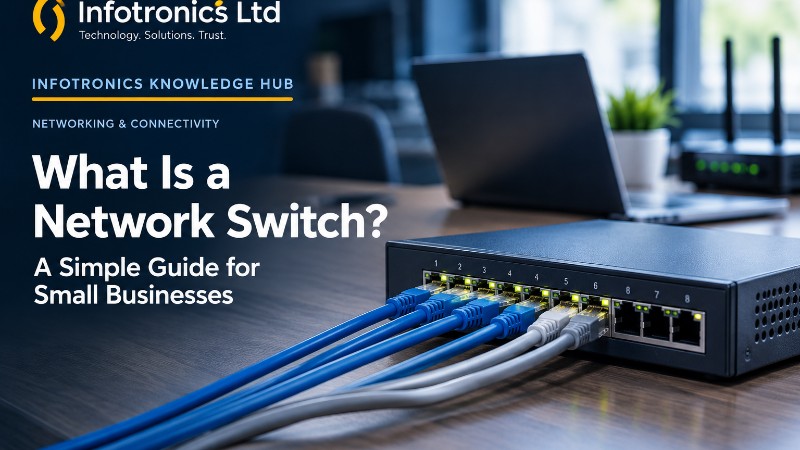
A network switch is a device that connects multiple devices to a local area network (LAN), usually through Ethernet cables. It directs network traffic to the appropriate connected device, helping computers, printers, servers and compatible network equipment communicate.
For example, an office can use a switch to connect several desktop computers and a printer to the same network. The switch may also connect to the office router, allowing those devices to access the internet through the router.
Not every business needs a separate switch. Many routers already include several Ethernet ports. A dedicated switch becomes useful when you need more wired connections, additional network capabilities or a better-organised network.
At a Glance
|
Network equipment |
Main purpose |
|---|---|
|
Network switch |
Connects multiple devices within a local network |
|
Router |
Connects different networks and commonly provides the connection between an office network and the internet |
|
Wireless access point |
Provides Wi-Fi connectivity to wireless devices |
|
PoE switch |
Provides network connectivity and power to compatible devices through Ethernet cables |
|
Network cable |
Carries data between wired network devices |
Some business devices combine multiple functions, so the equipment you need depends on your existing setup.
1. How does a network switch work?
Think of a small office with five desktop computers, one network printer and a file server. The devices need to exchange information and use shared resources.
Instead of connecting every device directly to every other device, you can connect each one to a network switch. The switch learns which devices are reachable through its ports and forwards Ethernet frames towards their destinations.
If one employee sends a document to a network printer, the switch helps carry that traffic across the local network. If a computer needs internet access, its traffic can pass through the switch to the router and then to the wider network.
A typical setup might look like this:
Internet connection
Router
Connects the office network to other networks
Network switch
Provides additional wired connections
Computers
Printer
Access point
Illustrative layout. The exact arrangement depends on your equipment and network design.
The switch does not automatically make an internet connection faster. It provides connectivity, while overall performance also depends on the router, internet service, switch capacity, cabling, connected devices and network traffic.
For a small business, the main benefit is having the right equipment to connect devices reliably and expand the network when needed.
2. What is the difference between a switch, a router and a Wi-Fi access point?
These three devices are often mentioned together, but they perform different roles.
Network switch
A switch connects wired devices within a local network. It is useful when several computers, printers, servers or other devices need Ethernet connections.
Router
A router forwards traffic between different networks. In a typical office, it connects the local business network to the internet and may also provide functions such as firewall protection, address assignment and other network services.
Wireless access point
A wireless access point allows Wi-Fi-enabled devices to connect to the network without using Ethernet cables directly. A separate access point can extend wireless access to more areas, depending on its placement and the network design.
Many home and small-office routers combine routing, Wi-Fi and basic Ethernet switching in one unit. A business may use separate devices when it requires more ports, better coverage, more control or a network designed for multiple areas.
Practical example: If the office internet is working but the business has more wired computers than the router can accommodate, a switch may solve the port shortage. If devices cannot connect to the internet because the router or internet connection has failed, adding a switch alone will not fix that underlying problem.
3. What are the main types of network switches?
Switches vary in the amount of control they offer and the equipment they can support. Three common categories are unmanaged, managed and smart-managed switches.
Unmanaged switches
An unmanaged switch is designed for straightforward connectivity. In most cases, you connect the cables, power it on and let it operate without configuring network settings.
It can be suitable for a small office that needs a few additional wired connections and has no requirement for advanced network controls.
Consider it when: You need basic connectivity for a simple network and have little need to separate traffic or configure advanced settings.
Managed switches
A managed switch offers configurable features for controlling, monitoring and organising network traffic. Depending on the model, features may include VLANs, quality-of-service settings, port monitoring and access-control capabilities.
These features can be useful in a business with multiple departments, IP phones, wireless access points, servers or different categories of network devices.
Consider it when: Your business needs greater control over network security, performance, monitoring or segmentation. The specific features available depend on the model, and correct configuration matters.
Smart-managed switches
Smart-managed switches offer a more limited set of configuration features than many fully managed models. They can be a practical middle ground for a business that needs some additional network control without the full feature set of a more advanced switch.
Do not choose by category alone. Compare the actual features you need, how the switch will be managed and whether your IT support can configure it correctly.
4. What is a PoE switch?
PoE stands for Power over Ethernet. A PoE switch can supply electrical power to compatible devices over the same Ethernet cable used to carry network data.
This can reduce the need for a separate power adapter at each device location.
Common examples of devices that may use PoE include:
-
IP desk phones.
-
Compatible Wi-Fi access points.
-
Network security cameras.
PoE is useful when a device needs both network connectivity and power, especially when its location makes a separate power connection inconvenient. However, not every switch port supports PoE, and not every network device uses it.
Before purchasing a PoE switch, check the device's supported power standard, required wattage, the number of PoE ports and the switch's total PoE power budget. A switch with many PoE ports may still be unable to supply every connected device at its maximum power requirement simultaneously.
Infotronics Expert Tip: When planning for IP phones or access points, list the exact devices you intend to connect before choosing a PoE switch. This helps avoid paying for unnecessary capacity—or discovering that the available power budget is insufficient.
5. How do you choose the right network switch for your business?
The best switch is not necessarily the one with the most ports or the highest specifications. It is the one that meets your current requirements and allows reasonable room for growth.
Count the devices that need wired connections
List the computers, printers, servers, access points, IP phones and other devices that require an Ethernet connection.
Remember to consider the port used to connect the switch to the router or another switch, plus any uplinks or redundant connections required by your design.
Switches are commonly available with different port counts, such as 5, 8, 16 or 24 ports, but availability varies by product range.
Choose a size that accommodates current needs and a sensible amount of expansion without purchasing capacity that serves no purpose.
Check the port speed
Gigabit Ethernet is common for business access connections, but it is not the right answer for every requirement.
Consider what the network will carry. Basic office tasks may have different demands from large file transfers, network-attached storage, high-resolution video workloads or connections to faster core infrastructure.
Check the speed supported by the switch ports, network interface cards and any connected equipment. A faster switch port will not by itself make a slower connected device operate at the higher speed.
Decide whether you need network management
If the only requirement is adding a few wired connections to a simple network, an unmanaged switch may be sufficient.
If you need to separate guest Wi-Fi from business systems, organise devices into VLANs, prioritise voice traffic or monitor individual ports, you may need a suitable managed or smart-managed model.
Those features must be supported by the switch and correctly configured. Some network goals also require compatible routers, access points or other equipment.
Determine whether PoE is necessary
If you plan to connect and power compatible access points, IP phones or cameras using Ethernet, check whether PoE is required and supported.
Confirm the relevant PoE standard, available ports and total power budget. If all connected devices use their own power supplies and will continue to do so, a non-PoE model may meet your needs.
Consider reliability, placement and future support
Think about where the switch will be installed, its ventilation and power requirements, how the cables will be routed, and whether the business needs monitoring or management tools.
For a growing office or a business that depends heavily on network connectivity, also consider how the network will be diagnosed and restored if equipment fails.
A network assessment can help you avoid buying a switch that is technically compatible but unsuitable for your wider environment.
6. Common network switch mistakes to avoid
Buying too few ports
Counting only the computers and forgetting printers, access points, phones and uplinks can leave the switch full immediately after installation. Plan for the devices you actually expect to connect.
Assuming a switch replaces a router
A standard Ethernet switch does not usually replace the router that connects the local network to the internet. Adding a switch will not solve a router failure or an outage from the internet provider.
Paying for features the business will not use
A fully managed switch may offer useful capabilities, but those capabilities can add cost and configuration requirements. A small, uncomplicated office may not need them. Equally, choosing an unmanaged switch for a network that needs segmentation and monitoring can create limitations later.
Ignoring PoE requirements
Do not assume every Ethernet port provides power. Verify compatibility, port availability and the switch's overall power budget before connecting PoE devices.
Neglecting network security
A switch is not a complete security solution. Protect administrator access on managed equipment, keep firmware maintained where supported, restrict access to network management interfaces and configure segmentation when needed.
Buying equipment without checking the whole network
A new switch can only work within the capabilities of the rest of the network. Check the router, cabling, internet service and connected devices before assuming that replacing one component will solve every performance issue.
7. When does your business need a network switch?
A dedicated switch is worth considering when:
-
Your router no longer has enough Ethernet ports for the devices you need to connect.
-
You are setting up a new office with several wired devices.
-
You need to connect computers, printers, IP phones or access points in an organised network.
-
Your business requires specific network-management features.
-
You are planning a network expansion and need to assess port capacity, PoE or traffic separation.
You may not need to buy a separate switch if the available ports on your existing router or network equipment already meet your requirements.
If a network is experiencing slow speeds, disconnections or unreliable internet access, identify the cause first. A switch may help with a port shortage or other switching-related limitation, but it will not automatically resolve Wi-Fi coverage problems, an overloaded internet connection or a failing router.
Frequently asked questions
Does a network switch make the internet faster?
Not automatically. A switch can provide reliable connections and may remove a particular network bottleneck, but actual performance depends on the entire network, including the internet connection, router, port speeds, cabling and connected devices.
Can I connect a network switch to my router?
Yes. In a typical setup, you connect an Ethernet port on the switch to an available LAN port on the router, then connect the additional wired devices to the switch. Check the equipment manuals and your existing network configuration, especially for more complex or managed networks.
How many ports does a small business need?
It depends on the number of devices requiring wired connections and the planned expansion. Count all wired endpoints and necessary uplinks, then allow reasonable additional capacity. Do not select a port count based only on the number of employees.
What is the difference between a managed and unmanaged switch?
An unmanaged switch generally provides basic plug-and-play connectivity. A managed switch allows more configuration, monitoring and control, with features varying by model. Smart-managed switches provide a more limited set of management capabilities.
Do I need a PoE switch for Wi-Fi access points?
Only if your access points are designed to receive power through Ethernet and you intend to power them that way. Check the model's power requirements, compatible PoE standard and the switch's output capacity. Some access points use a separate power adapter or another approved power method.
Can a network switch work without internet access?
Yes. Devices connected to the same local network can still communicate with each other when the internet connection is unavailable, provided the local network is operating correctly and the services they require remain available locally.
Should I choose an unmanaged switch for my office?
It may be suitable if you need only basic wired connectivity and do not require advanced configuration. If your business needs traffic separation, network monitoring, access controls or specialised performance settings, evaluate managed options as well.
The Infotronics Verdict
A network switch is a straightforward but important part of many business networks. It allows multiple wired devices to communicate through a local network and makes it easier to add connections as an office grows.
For a small business, the decision should begin with the actual requirement: how many devices need connections, what speeds are necessary, whether PoE is needed, and whether the network requires additional management or security features.
Choose the equipment to suit the environment rather than buying the largest or most advanced option by default. A properly planned network can be easier to maintain, expand and troubleshoot.
Need help with your business network?
If your office needs more wired connections, a network expansion, Wi-Fi access points or help assessing its existing setup, Infotronics can discuss the requirements and suitable options for your environment.
Infotronics Ltd
Pumping Hydraulics, Outering Road
Phone: 0756398449
Email: sales@infotronics.co.ke
Continue Learning
Link this article to the following published Knowledge Hub articles:
-
How to Improve Wi-Fi at Home or in the Office in 2026 — helps readers understand wireless coverage and common Wi-Fi issues.
-
What Is Cloud VoIP and IP PBX? A Practical Guide for Businesses — connects the discussion to business communication and IP phones.
-
How to Choose the Right Printer for Your Home or Business in 2026 — supports readers planning shared office printing and network connectivity.