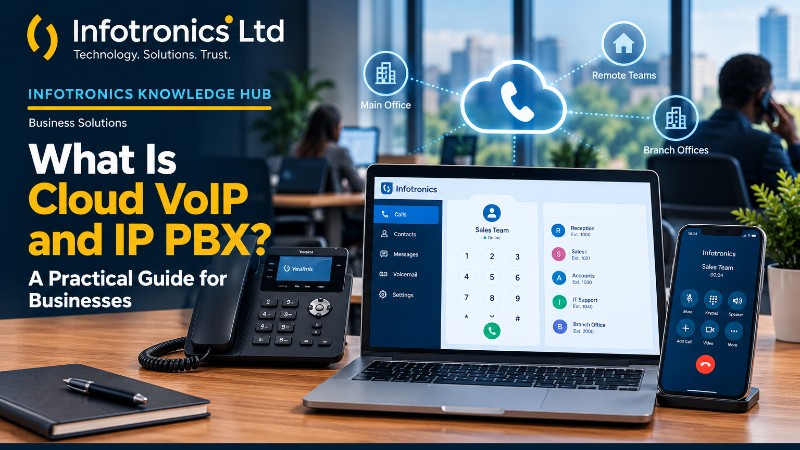
What Is Cloud VoIP and IP PBX? A Practical Guide for Businesses
Infotronics Knowledge Hub
Infotronics Business Solutions
Helping you make smarter technology decisions.
What Is Cloud VoIP and IP PBX? A Practical Guide for Businesses
Reading Time: 8–10 Minutes
Quick Answer
Cloud VoIP is a technology that allows people to make voice calls over an internet connection rather than relying entirely on traditional telephone lines.
An IP PBX is a telephone system that manages call routing and extensions over an IP network.
When these technologies are combined in a cloud-based setup, a business can organise telephone extensions for its employees, departments and branches without depending entirely on a physical telephone exchange installed at its premises.
Depending on the solution, employees may be able to use desk phones, computers or compatible mobile devices to access their extensions.
For businesses with multiple departments, remote employees or several branches, cloud telephony can provide a more flexible way to manage internal communication.
The main idea is simple: give your business an organised telephone system that can work across different locations.
What Is VoIP?
VoIP stands for Voice over Internet Protocol.
In simple terms, it is a technology that carries voice communication over an IP network, such as an internet connection.
Think about how businesses communicate today. Employees may use mobile phones, traditional office telephones, messaging applications and internet-based calling tools.
VoIP allows voice communication to become part of the business's IP infrastructure.
Instead of every employee depending on a separate conventional telephone arrangement, a suitable VoIP solution can provide a structured system through which users communicate.
For businesses, the value goes beyond making a call. It is also about organising how employees and departments communicate.
What Is an IP PBX?
PBX stands for Private Branch Exchange.
Traditionally, businesses used a PBX to connect office telephone extensions. An employee could have an extension number, and colleagues could communicate using the organisation's internal telephone system.
For example, a business might assign:
-
Extension 1000 to Administration
-
Extension 1021 to Sales
-
Extension 1051 to Customer Service
These are illustrative extension assignments, not fixed requirements.
An IP PBX performs telephone-system functions using IP networking technology.
It can organise extensions and manage calls within the capabilities of the particular system.
What Makes a Cloud PBX Different?
A conventional on-premises PBX relies on telephone equipment installed at the business premises.
A cloud PBX uses a server hosted in a cloud environment to provide the telephone-system infrastructure.
This changes how the organisation deploys and manages its communication system.
Rather than relying entirely on a physical PBX at the office, the business can use a hosted system and configure supported devices to connect to it.
Infotronics' Cloud VoIP and IP PBX service is based on this cloud-hosted approach. Its service documentation describes a hosted virtual server, organisation-specific subdomain and extension configuration for users' devices.
Why Are Businesses Moving Towards Cloud Telephone Systems?
Business communication is no longer limited to people sitting in the same office.
Employees may work from different branches, travel for meetings, operate remotely or support customers from different locations.
A telephone system tied entirely to one physical office may not provide the flexibility the organisation needs.
Cloud-based telephony can help businesses organise their communication around their actual working arrangements.
1. Connect Employees Across Different Locations
Imagine a company with an office in Nairobi and another branch in Mombasa.
The employees need a consistent way to communicate, but they are not physically in the same building.
A cloud telephone system can provide a centralised extension arrangement for users in different locations, subject to the system configuration and connectivity available.
This allows a business to plan its communication structure around departments, employees and branches rather than treating every office as a completely separate telephone environment.
2. Give Employees Their Own Extensions
Extensions help an organisation structure its communication.
Instead of relying entirely on individual personal phone numbers, the business can assign extensions according to its departments or internal arrangements.
For example, Administration might have one range of extensions while Sales uses another.
This can make it easier to identify users and organise internal communication.
3. Support Remote Working
Some employees do not spend every working day in the office.
Sales representatives, managers and other staff may need to communicate while away from the workplace.
Infotronics' cloud VoIP service is designed to support mobile-phone configuration, allowing compatible user devices to be configured for their assigned extensions.
This can help an organisation extend its telephone arrangement beyond the physical office.
4. Reduce Dependence on Physical PBX Equipment
Traditional PBX equipment occupies space and may require power, maintenance and physical servicing.
A cloud-hosted approach reduces dependence on having the telephone exchange physically installed at the business premises.
The organisation still requires suitable devices, reliable connectivity and the infrastructure needed to use the service, but the telephone-system hosting is handled through the cloud arrangement.
5. Support Communication Across Branches
A business with several branches needs a communication arrangement that reflects its organisational structure.
Infotronics' service documentation describes creating extension ranges for different branches and departments.
For example, a business might allocate one extension range to Branch A and another to Branch B.
The precise numbering plan should be agreed during implementation so that it suits the organisation.
How Does a Cloud VoIP System Work?
The process can be easier to understand when broken into stages.
Step 1: The Business Plans Its Telephone Structure
Before configuring the system, the organisation decides who needs an extension, where the users will work and how the communication system should be organised.
Step 2: The Cloud Environment Is Prepared
The hosting environment is established for the organisation's telephone system.
Infotronics' documented implementation process includes creating a virtual server and arranging a subdomain for the organisation.
Step 3: Extensions Are Created
The required extensions are created according to the agreed numbering plan.
These may be arranged by department, employee or branch.
Step 4: Devices Are Configured
The extensions are configured on the intended devices. Depending on the planned setup, these may include suitable desk-phone equipment or users' mobile phones.
Step 5: Users Learn How to Operate the System
Users need to understand how to access their extensions and make calls.
Infotronics' service write-up also includes training for the organisation's IT personnel on managing extensions, configuring devices and making calls.
Step 6: The Organisation Uses and Maintains the Service
Once the system is configured and users are trained, the organisation can use it as part of its communication workflow.
The Infotronics service description includes ongoing support for the period in which the organisation uses the service.
Who Can Benefit From Cloud VoIP?
Cloud telephony can be useful for a variety of organisations, particularly where internal communication spans multiple people or locations.
Small and Medium-Sized Businesses
A business with separate Administration, Sales and Customer Service functions may benefit from organising its internal telephone communication through extensions.
Multi-Branch Businesses
Organisations operating several offices or outlets may value a centrally hosted telephone arrangement that supports users across locations.
Businesses With Remote Employees
Where staff work away from the office, compatible mobile-device configuration can help extend the telephone arrangement beyond the physical workplace.
Customer Service Teams
Organisations that coordinate communication between employees or departments may benefit from a structured extension plan.
The suitability of a particular deployment depends on the organisation's communication requirements and the service configuration.
What Do You Need to Get Started?
A cloud telephone system requires planning. It should not simply be deployed without considering how the business communicates.
The Infotronics service documentation identifies several important requirements.
1. A Clear Communication Plan
Start by asking three questions.
Why? Do you want to organise internal communication, reduce dependence on airtime credit for internal calls, modernise an analogue setup, connect branches or support conference calls?
Where? Will users operate from the office, use mobile phones or work with a mixture of devices?
When? Is the internet connection ready to support the planned deployment?
These questions help determine how the system should be configured.
2. Reliable Internet Connectivity
Cloud VoIP depends on internet connectivity.
For a satisfactory calling experience, the connection should have stable performance and enough capacity for the expected usage.
Infotronics' service document specifically recommends planning for stable upload speeds and states that an internet connection with a stable 10 Mbps upload speed will work well for the proposed setup.
Actual requirements can vary with the number of simultaneous calls, codec configuration, other network activity and the deployment design. The connection should therefore be assessed against the business's intended usage.
Mobile data may also be suitable for mobile users when the available connection is stable enough.
3. An Email Address
Infotronics' documented setup process requires an email address for creating the cloud VoIP account.
4. An Organisation-Specific Subdomain
The implementation process includes preparing a virtual server and arranging a subdomain for the organisation's cloud telephone system.
The specific domain and hosting arrangement should be agreed during onboarding.
5. An Extension Numbering Plan
The business needs to decide how extensions should be organised.
For example, different number ranges could be allocated to Administration and Sales, with separate ranges for other branches.
The example numbers in the setup documentation illustrate one possible structure. Your final plan should reflect your actual departments, users and locations.
6. Device Configuration and Training
Once the extensions are created, the relevant devices need to be configured.
The organisation's IT representative should also understand the basic tasks required to manage extensions and assist users.
7. Ongoing Support
It is important to understand who will help when a user needs assistance, a device requires reconfiguration or the organisation needs to change its extension arrangement.
Support arrangements should be clarified before implementation.
Can Cloud VoIP Reduce Communication Costs?
It can help reduce some communication costs, particularly where employees would otherwise use airtime credit for internal calls.
Infotronics' service description specifically identifies reduced dependence on airtime credit for internal communication as a potential benefit.
However, this does not mean every call becomes free.
The business should consider hosting fees, internet costs, devices, implementation costs and any charges associated with external calling or additional services.
The actual financial benefit depends on how the organisation communicates today and how it will use the new system.
A sensible comparison looks at the complete cost of communication, not just the cost of making a call.
Is Cloud VoIP Secure?
Security should be considered as part of the system design, not as an afterthought.
Infotronics' service description presents its cloud telephone arrangement as a private communication environment rather than a call centre exposed to the public domain.
For any implementation, the business should discuss the relevant security configuration, account access, authentication, network protection and management responsibilities with its service provider.
A private deployment approach should not be treated as a guarantee that every possible security risk has been eliminated.
The appropriate controls depend on the actual hosting and configuration.
What Does Cloud VoIP Cost?
The cost depends on the deployment and the services required.
Infotronics' service documentation describes:
-
A minimal one-time setup fee.
-
Monthly or annual cloud-server hosting fees.
The final cost should be discussed with Infotronics based on the organisation's requirements, planned extension arrangement, devices and hosting period.
When comparing service providers, ask for a clear explanation of the setup costs, recurring fees, support arrangements and any additional charges.
Common Mistakes to Avoid
Mistake 1: Starting Without a Communication Plan
The business should decide which users need extensions, where they will work and how departments should be organised before implementation.
Mistake 2: Underestimating Internet Requirements
A cloud telephone system depends on the quality and stability of its connection. Plan for the expected usage rather than relying only on the advertised download speed.
Mistake 3: Choosing Devices Before Understanding the Setup
Decide whether users need desk phones, mobile-phone configuration or a combination of devices before finalising the implementation.
Mistake 4: Ignoring Training
Users need to know how to access their extensions and operate the system. The designated IT representative should also understand basic extension management.
Mistake 5: Comparing Only the Hosting Fee
Consider the full cost, including setup, connectivity, devices, hosting and support.
At a Glance
| Business Requirement | What to Consider |
|---|---|
| Internal communication | Extension structure and calling requirements |
| Multiple branches | Branch-based extension planning |
| Remote employees | Mobile-device compatibility and connectivity |
| Cloud hosting | Server and subdomain arrangements |
| Reliable calling | Stable internet connection |
| Day-to-day management | IT-personnel training |
| Long-term use | Hosting fees and ongoing support |
Frequently Asked Questions
What does VoIP stand for?
VoIP stands for Voice over Internet Protocol. It allows voice calls to be carried over an IP network, such as an internet connection.
What is an IP PBX?
An IP PBX is a telephone system that manages extensions and call routing using IP networking technology.
What is the difference between a traditional PBX and a cloud PBX?
A traditional on-premises PBX depends on telephone-system equipment installed at the organisation's premises. A cloud PBX uses a hosted environment, reducing the need to depend entirely on physical PBX equipment at each location.
Can employees use their mobile phones as extensions?
This depends on the solution and its configuration. Infotronics' cloud VoIP service documentation includes configuration of extensions on users' mobile phones.
Can a cloud telephone system connect multiple branches?
A cloud-based extension arrangement can be planned for users in different branches. Infotronics' service documentation describes organising extension numbers by branch and department.
Does cloud VoIP require internet?
Yes. The service depends on internet connectivity, and the connection should be stable enough to support the planned calling activity.
Can cloud VoIP reduce airtime costs?
It can reduce dependence on airtime credit for internal calls where those calls are carried through the cloud system. Internet, hosting, setup and external-calling costs should still be considered.
What does Infotronics provide?
The Infotronics service write-up describes planning, cloud-server setup, extension creation, device configuration, IT-personnel training and ongoing support.
Is there a monthly or annual fee?
Infotronics' service documentation describes a one-time setup fee alongside monthly or annual cloud-server hosting fees. Confirm the current pricing and available packages directly with Infotronics.
The Infotronics Verdict
If your organisation relies on several employees, departments or branches to communicate every day, it may be worth evaluating a cloud-based telephone system.
Don't begin by choosing phone equipment. Begin by understanding how your business needs to communicate.
Plan the extension structure, assess the internet connection, decide which devices users will need and understand the full cost of the service.
Infotronics Cloud VoIP and IP PBX offers a cloud-hosted approach to business extensions, with implementation, device configuration, training and ongoing support included in the documented service process.
Build a communication system around the way your business works.
Need Help Modernising Your Business Communication?
Infotronics provides Cloud VoIP and IP PBX services for organisations looking to modernise their internal telephone communication.
Whether you need to organise extensions for different departments, connect users across branches or explore mobile access to your business telephone system, start by discussing your requirements.
The Infotronics team can help you assess your communication needs and plan the appropriate setup.
Call or WhatsApp: 0756 398 449
Email: sales@infotronics.co.ke
Infotronics Ltd
Pumping Hydraulics, Outering Road
Continue Learning
Explore more from the Infotronics Knowledge Hub:
-
What Is a POS System and How Does It Work?
-
Manual Stock Management vs POS Systems: Which Is Better for a Growing Business?
-
What Is a Healthcare Management System?
-
How to Improve Wi-Fi at Home or in the Office
-
How Digital Records Can Improve a Small Business
About the Infotronics Knowledge Hub
The Infotronics Knowledge Hub helps individuals and businesses understand technology and make informed decisions.
Our guides cover computers, networking, digital business systems, business communication and other practical technology topics.
Whether you're modernising an existing setup or planning a new technology deployment, our goal is simple:
Help you make smarter technology decisions.